 BagusPOS
DuitNow QR at the counter, matched to the bill automatically
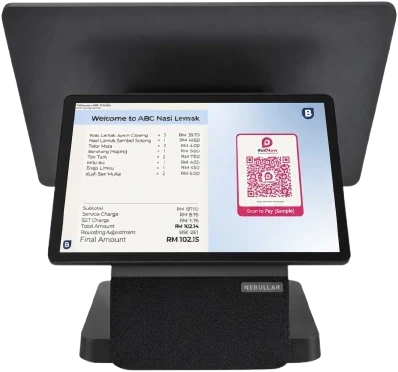
DuitNow QR is Malaysia's national QR code, so one code lets customers pay from their banking app or e-wallet. FinPOS shows a dynamic DuitNow QR on the customer screen with the bill amount already in it, so the customer just scans and pays, and the payment is matched to its POS bill without anyone keying it in.
What DuitNow QR is
DuitNow QR is Malaysia's national QR code standard, run by PayNet. A customer scans one QR code with the app of a participating bank or e-wallet, and the payment goes straight to the merchant's account.
For a merchant, that means one QR code on the counter covers the banking apps and e-wallets your customers already use, instead of a separate sticker for each wallet.
A static QR sticker is the same code for every customer, so the customer has to type the amount. A dynamic QR is created for each bill and carries the bill amount, so there is nothing to type and no wrong amounts.
How DuitNow QR works in FinPOS
- The cashier or the customer finishes the order on the POS or the self checkout.
- A dynamic DuitNow QR code for that bill appears on the customer screen, showing the bill amount.
- The customer scans it with their banking app or e-wallet, checks the amount and confirms the payment.
- The POS marks the bill as paid when the payment arrives, with nothing to key in.
- The money reaches your bank account the next working day (T+1), and the payment stays matched to its POS bill.
Why matching to the bill matters
Many shops use a static QR sticker. The money reaches the account, but the POS is told nothing, so someone has to compare the bank or wallet report with the POS at the end of the day.
In FinPOS the dynamic QR is made for one bill, so each payment carries the POS bill number it belongs to. Sales and payments appear on one list in BagusPay Insights, and nobody has to match them by hand.
Accept every way customers like to pay
DuitNow QR sits on the same screen as credit and debit cards, tap to pay (Apple Pay and Google Pay) and more than 10 e-wallets, so cashiers use one flow whatever the customer chooses. See all the payment methods on the FinPOS home page.
Who it suits
FinPOS is built for cafes, restaurants and retail shops where the counter is busy and the books need to close without extra work. It comes from BagusPOS, which also makes BagusONE for sales and BagusPay for payments.
Common questions
Is it a static or a dynamic DuitNow QR?
Dynamic. FinPOS shows a new DuitNow QR for each bill with the bill amount already filled in, so customers do not type the amount.
Do customers need a special app to pay with DuitNow QR?
No. Any banking app or e-wallet that supports DuitNow QR can scan the code.
When does the money from DuitNow QR reach my bank?
On the next working day (T+1), and each bank credit is matched to your POS bills.
Can I take cards and DuitNow QR on the same screen?
Yes. Cards, tap to pay, DuitNow QR and e-wallets are all taken in the same screen, with no separate terminal to key in.
What happens if the connection between the POS and the card terminal breaks?
The cashier can take the payment on the card terminal by hand. It shows in BagusPay Insights as a manual transaction, so you know which ones to check.